Quick Response Garage Doors installs Wi-Fi garage door openers and add-on smart controllers in Renton, sets the app up on your phone, and repairs the ones that stopped answering it. You hear the options first, and the estimate is free.
Tell us what the door is doing. The estimate is free either way.
On a lot of hillside homes the garage sits underneath the living space, so the garage door doubles as an exterior wall of the home. Leave it up and the house is open. An app tells you the moment the door moves, and it lets you close one you forgot about while you're at the office, the gym or the grocery store.
It also handles the small daily snags: a teenager who lost the remote, a dog walker who needs in at noon, a package that belongs inside instead of soaking on the front step. Access goes to a phone, and it can be taken back just as easily.
The motor, the rail and the photo eyes don't change. A Wi-Fi module, either built into the opener or wired to it, reports whether the door is up or down, and the app sends commands back the other way. That's all there is to it, which is why the opener underneath still decides how well the whole thing works.
Typical features are opening and closing from anywhere you have a signal, a notice on your phone whenever the door moves, a running log of every opening, access for other family members, and on many models an auto-close setting for a door left up too long. Some units add a camera. The exact list depends on the maker and the model you pick.
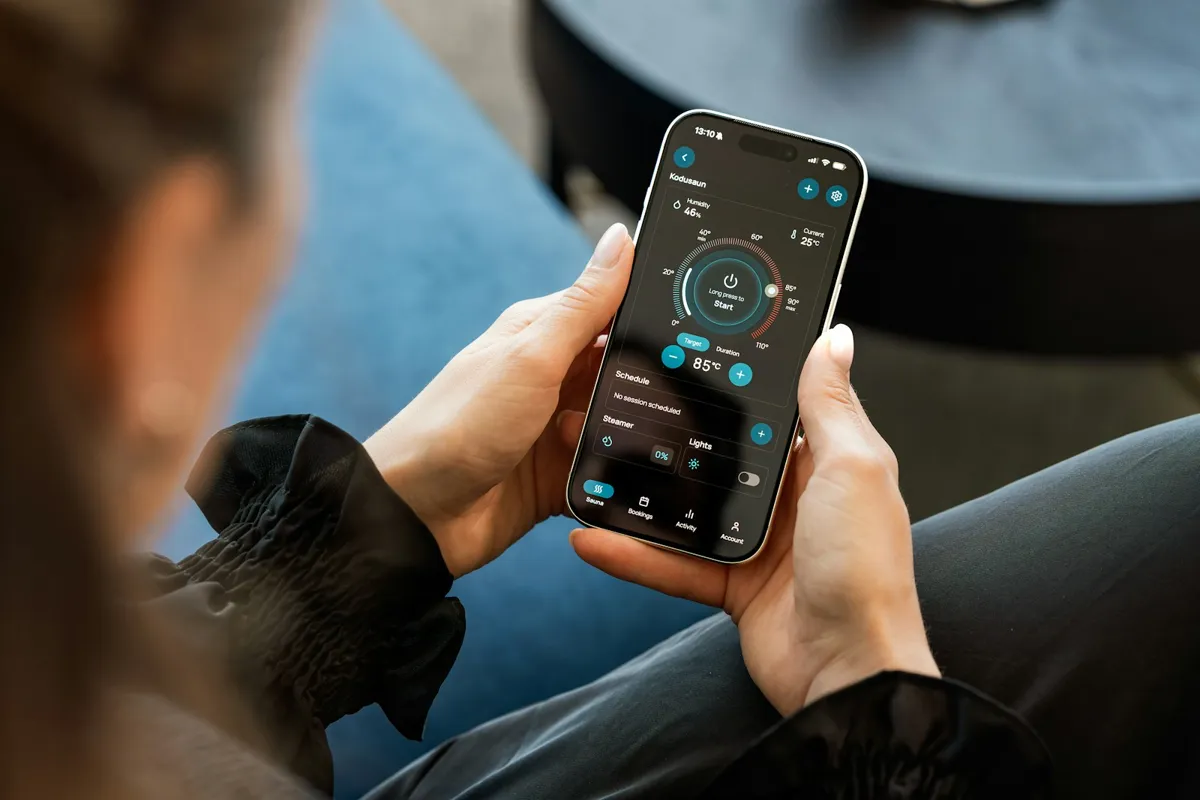
On LiftMaster and Chamberlain units the app is called myQ; on Genie units it's Aladdin Connect. Most current models from those makers ship with the Wi-Fi already inside, so a new opener is ready for the phone on day one.
If your opener is sound, an add-on controller is the other route: a small hub mounted near the motor head and wired to its terminals, plus a tilt sensor on the top panel that tells the hub whether the door is up or down. It takes no extra ceiling space and keeps a good opener in service.
Some openers shouldn't get either. An opener whose photo eyes don't work, or one already laboring to lift the door, isn't something to run from miles away. You get a plain answer on which way to go once the technician has seen the garage.
The fall and winter storms that knock the power out are the real test of a smart setup. With no power, the opener can't run and the router can't connect, so the app goes quiet along with everything else. An opener with battery backup still answers the wall button, the remotes and the keypad through the outage, and the app picks the door up again once the home network is back.
The surge when the lines come back is what usually ruins an opener's circuit board. A plug-in surge guard for the opener's outlet is a small addition worth making on the same visit, smart opener or not.
A garage tucked under the house sits below floors, joists and often a concrete wall, and Wi-Fi fades through all of it. A detached garage at the end of a long driveway has the same problem with distance. Many smart openers and hubs can only use the 2.4 GHz side of a router, and plenty of newer routers hide that behind a single combined network name.
So the signal is measured at the opener before anything goes up. When it's weak you know beforehand, and the usual answer is a mesh node or a range extender placed nearer the garage, which stays your choice and your equipment.
An app doesn't replace the everyday controls. The remote on the visor and the keypad beside the door are still the quickest way in on most trips, and the buttons built into many cars can learn the opener as well. On a new opener all of them are set up along with the app; with an add-on controller, the ones you have keep working.
Old fixed-code remotes are the exception. If yours date from that era, a smart upgrade is a good moment to move to rolling-code remotes that can't be copied by someone sitting in the street.
It goes the same way whether the answer is a new opener or a controller on the old one.
Most smart opener calls aren't about the motor. The app shows the door offline, or shows it open when it's shut, or the door runs from the wall button and ignores the phone. After a storm outage or a new router, the cause is usually the network the opener was paired to; a door sensor that has slipped or run its battery down gives wrong positions; and a damaged board can produce any of these symptoms.
Say what the app shows and how the door behaves, and the visit begins with whatever fits those symptoms best. If the opener itself is worn out, you get the repair and a replacement laid out next to each other.
Only an opener with battery backup keeps running. The wall button, remotes and keypad work on the battery, and the app catches up once the power and the internet return. Without backup, nothing moves until the power is back.
Not always. A controller added to a sound opener with working photo eyes gives most of the same features. An opener that struggles or has dead eyes is better replaced, and you hear which applies before any work.
The opener is still looking for the old network name and password. It has to be paired with the new network, which is a short part of any visit.
Yes. Most systems let you share app access with family members, and most let you create temporary guest access that you can remove later.
Openers made for remote use give a warning first, a flashing light and a beep, before the door starts down. The photo eyes and the auto-reverse behave just as they do with the wall button, and both get tried on every install.
Remotes that already work with the opener keep working when a controller is added. With a new opener, compatible remotes are paired again and the buttons built into your cars are programmed too.
Yes. The door, the opener and the Wi-Fi at the garage are all looked at, and nothing goes up until you've seen the free estimate.
Tell us the fault and you'll get a straight answer on whether it can wait. Free estimate anywhere in King County.
Prefer to talk it through? Call (425) 696-1678.
Tell us what the door is doing. The estimate is free either way.